Ads 468x60px

Pages

Jumat, 10 Januari 2014

Color Splash FX Full v1 3 4 apk 1 3 4

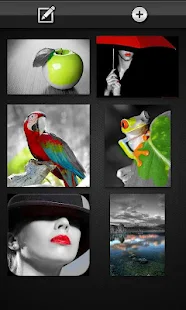
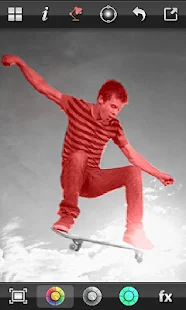
- Gray out everything in your photo except your face!


Direct Link

Size: 1.6 MB
Android Requires : 2.1+

More Info On Google Play:
https://play.google.com/store/apps/details?id=slide.colorSplashFX


 Color Splash FX - screenshot thumbnailColor Splash FX - screenshot thumbnailColor Splash FX - screenshot thumbnailColor Splash FX - screenshot thumbnailColor Splash FX - screenshot thumbnailColor Splash FX - screenshot thumbnailColor Splash FX - screenshot thumbnailColor Splash FX - screenshot thumbnail
Recent changes:
1.3.3
- fix some image files not importing correctly, e.g. gif

1.3.2
- removed many prompts and fewer ads

1.3.1
- All ads can be removed for free!
- Added permissions get_tasks and get_accounts so that unlocked features are not lost when changing devices or after reinstalling

1.3.0
- All featured can now be unlocked completely FREE using GetJar rewards!
- Unlockable feature to get higher res output 

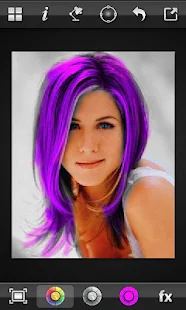
- Make your hair green
- Paint a flag over your face
- Change the color of the water, the sky, anything you like!!
The fast and liquid smooth interface makes Color Splash FX easy and fun!
--- Version 1.2 is here!! ---
Choose FX to apply color splash with!!
Unique Features :
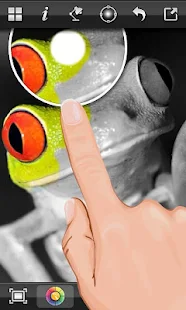
★ Paint in color or gray
★ Recolor any part of your photo with a completely new color!
★ Zoom in and out or scroll with two-finger pinching gestures
★ Pixel perfect brush adjustment: size, edge, opacity
★ Brush size adjusts to size of your finger!
★ Unlimited undo for accidental touch
★ Save sessions and continue where you left off
★ Import photos from your photo album or camera
★ Works in portrait / landscape modes
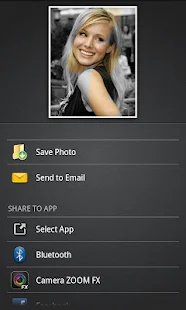
★ Share your masterpieces to Facebook, Twitter & Flickr
★ Support for all phones and tablets
★ Set as wallpaper / contact
★ Full help and instructions
Supported FX :
★ Color Splash
★ X Ray
Pro FX :
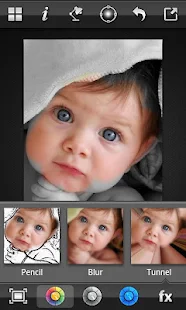
★ Pencil
★ Blur
★ Tunnel
★ Mosaic
★ Color Flip
★ Exorcist
★ Spectrum
★ More coming soon!
Even more features available when upgrading to pro within the app (now available as free download!!) :
★ Increase zoom to 20x
★ Show brush tip
★ Magnify area under finger
★ Highlight colored regions with a red tint
★ Remove ads
★ Much more coming soon!
Create stunning effects in seconds. Fast and fun art, works great together with free Photoshop and Instagram apps.

New permissions: get_tasks and get_accounts have been added so that unlocked features are not lost when changing devices or after reinstalling
How To Download In
How To Download In
How To Download In
How To Download In
how-to-download-in-tusfiles

Read More..

Kamis, 09 Januari 2014

Dead Ahead MOD APK v1 1 0 1 1 0 Mod Unlimited Money


Dead Ahead Mod Unlimited Money Apk

Features

  • An action packed endless zombie runner
  • Quirky sense of humor and pixel-inspired visuals
  • Pimp your ride and upgrade your weapons
  • Complete missions to rank up and earn greater rewards
  • Customize and share your own progress banner


Version: 1.1.0
Requires Android: 2.3 and Up
Google Play: Link
Instruction: Simply install apk and play

Thanks & keep visiting my blog androidcrackedgames.blogspot.com a big thanks to all my blog visitors love ya all !!

Download Mod Apk
Read More..

Rabu, 08 Januari 2014

Check out Amazons latest OS 3 0 Mojito

Amazons Fire OS 30 Mojito arrives just in time for those new tablets
New hardware without a software refresh? Dont make Jeff Bezos laugh. Todays arrival of three new slates also marks the unveiling of the companys latest tablet operating system. And this time, it even has a name. See, Amazons been using "Fire OS" internally to describe the software powering its tablet line, and now we get to use it as well, with the arrival of version 3.0. As ever, Bezos and Co. have based the OS on Android (Jelly Bean, this time out), with this years codename being "Mojito" -- a move from candy names to sugary cocktails. The operating system will ship on the new HDX and HD devices. We werent able to confirm that it will roll out to older devices, but an Amazon rep we spoke with implied that theres a good chance of that, given earlier precedents.
First things first: theres still no Google Play access. No surprise there, of course. After all, the companys in the habit of subsidizing the cost of its hardware based on future content sales. Still, as ever, the company was quick to point out the speed with which its proprietary app store has grown in recent years. UI-wise, things look familiar. Content is still king, with the home screen built around a river of apps, games, movies, music, et cetera. The company did respond to customer concerns, however, by adding a more familiar grid-style layout that you can access with a swipe up, which should appease all you Android users out there. Swipe from the right, and youll see Quick Switch, which lets you switch between different recently used pieces of content.
The new feature that had Bezos particularly giddy is Mayday. The buttons based in the Quick Settings (also accessible with a swipe), alongside options for Auto-Rotate, Brightness, Wireless, Quiet Time (to shut off those nagging notifications, when youre doing things like reading). The feature bakes a live, human help module directly into the OS (on the HDX, at least -- the HD doesnt have a mic to support it). A little box will pop up with a real, live person on the other end. You can see them, but they can only see your screen -- and, if prompted, theyll pause their end, so they cant see you do things like entering passwords.
Amazons Fire OS 30 Mojito arrives just in time for those new tablets
Amazons utilizing its existing army of help technicians for the feature, and will likely be employing even more folks for the inevitable Christmas crunch. Help comes in the form of asking to adjust settings or less-serious things like getting game recommendations. The Amazon employee can either take you through the steps by drawing some Monday Night Football-style circles and arrows on the screen, or they can just do it for you. Its a really promising feature, for sure, particularly for Amazons sizable user base of kids and some non-tech-savvy grownups. Well admit, however, that it took a little getting used to talking to someone in that way, particularly when they couldnt see us back -- though many times thatll likely be for the best.
Second Screen is Amazons big push to get people to use their Fires in front of their TVs. The feature "flings" content to your set, by way of your PlayStation 3 / 4 or Samsung smart TV. More content partners are coming, as well. When we asked specifically about Chromecast, we just got a "stay tuned," however. The content itself isnt actually streamed from the tablet. Instead, the set is pulling it down from the cloud, but you can still use your Fire to control it. Once the content is flung, youll get contextual information by way of X-Ray, which now also features the names of songs that are playing, character names and trivia from Amazons IMDb service. Speaking of X-Ray, 3.0 brings X-Ray Music, which includes lyrics licensed (not crowdsourced, mind) by Amazon. Youll be able to see them whether or not youre online.
Amazons Fire OS 30 Mojito arrives just in time for those new tablets
As with the Paperwhite, Goodreads is now built in -- or at least it will be by the time 3.1 rolls around. Once that 3.1 upgrade starts rolling out over the air (sometime in mid-November), Goodreads will offer the ability to share quotes, review titles and get recommendations as youre reading the book. Reading Mode, meanwhile, turns off unnecessary processes while your nose is in a book, giving you up to 17 hours of life on the HDX devices. The company is using Mojito to make a big push toward enterprise users, for those who prefer to take their personal device to work. Theres support for wireless printing for documents, email with threaded messaging and support for enterprise services like VPN and Kerberos authentication. Amazon is also talking up the ease of developing for the operating system, when it comes to porting over apps from Android, thanks to support for Native Android App Compatibility.
Read More..

Selasa, 07 Januari 2014

The Highest Ratings top 10 smartphone in 2013

Smartphone is the most popular in the mobile world . when we are Purchase a smartphone we are confuse Ill leave what . The best smartphone on the market in a big budget and want to buy it, they really go confuse. There is a device on the market at the top! What benefits other device . To this end all confuse for this post .show up in the top 10 of the 2013 android devices . 


Im going to show you what is in my mouth .The users now want to know what all of these reviews . 


Read More..

How to Root Galaxy Note 8 0 N5100 on Android 4 2 2 XXCMH1 Jelly Bean Firmware

A new Android 4.2.2 Jelly Bean update with firmware build number N5100XXCMH1 has been released on the international 3G version of Samsung Galaxy Note 8.0 (GT-N5100).

Samsung Galaxy Note 8.0 N5100 users who have already updated their devices with Android 4.2.2 XXCMH1 Jelly Bean, may root their devices using the tutorial below.

This tutorial uses CF-Auto-Root file released by recognised XDA Developers, Chainfire. The CF-Auto-Root file allowing Galaxy Note 8.0 users to root their devices easily without depending on the firmware. It completely supports Android 4.2.2 Jelly Bean and future firmware as well. Head over to the CF-Auto-Root main thread to learn more about the root method.

Disclaimer: Rooting voids the warranty of your device. We and the developer of this rooting procedures shall not be held responsible if any undesirable outcomes may happen to your device. use of this root guide is solely at your own risk!

Pre-requisites
1. Install USB Drivers for Samsung Galaxy Note 8.0 on the computer.
2. Enable USB Debugging Mode on the phone by navigating to Settings >> Developer Options.
3. Make a backup of all your important data before following the guide.
4. The Galaxy Note 8.0 should be factory unlocked and not locked to any particular carrier.
5. Ensure the battery of the phone is charged more than 80 per cent.
6. The CF-Auto-Root file works only on Samsung Galaxy Note 8.0 N5100. Applying this to any incorrect variant might brick the device. Verify the model number of the Galaxy Note 8.0 by navigating to Settings >> About Phone.

File Required
1. CF-Auto-Root for Galaxy Note 8.0 N5100 (CF-Auto-Root-kona3g-kona3gxx-gtn5100.zip)
2. Odin 3.07

Steps to Root Galaxy Note 8.0 N5100 Running on Android 4.2.2 Jelly Bean Firmware
Step 1: Extract CF-Auto-Root and Odin 3.07 files using winrar/7zip/winzip or any other extracting tool.
Step 2: Switch off the Galaxy Note 8.0. Then boot the device into Download Mode by pressing and holding Volume Down, Home and Power buttons together until a construction Android robot icon with a warning triangle appears on screen. Now press the Volume Up button to enter Download Mode.
Step 3: Launch Odin on the computer as an Administrator.
Step 4: Connect the Galaxy Note 8.0 to the computer using USB cable while it is in the Download Mode. Wait until Odin detects the device. When the device is connected successfully, the ID: COM box will turn blue with the COM port number. Additionally, the successful connected will be indicated by a message saying Added.

Note: If the Added message does not appear, then try re-install USB drivers or changing the port on the computer.

Step 5: In Odin, click the PDA button and select the CF-Auto-Root-kona3g-kona3gxx-gtn5100.tar.md5 file.
Step 6: Verify that Auto Reboot and F.Reset Time checkboxes are selected in Odin. Also, ensure the Re-Partition option is not selected.
Step 7: Double-check and click Start button in Odin. The installation process will now begin.
Step 8: Once the installation process is completed, your phone will restart and soon you will see a PASS message with green background in the left-most box at the very top of the Odin. You can now unplug the USB cable to disconnect your device from computer.

Samsung Galaxy Note 8.0 N5100 running on Android 4.2.2 Jelly Bean firmware is now rooted successfully. You can now install any app that requires root permission. Verify the root status of the device by downloading Root Checker app from Google Play Store.

Thanks to all fellas at XDA who first tried out this rooting technique. This method was originally posted via XDA-Developers original thread.

Click here to know How to Update Galaxy Note 8.0 N5100 with official Android 4.2.2 XXCMH1 Jelly Bean firmware.
Read More..

Sabtu, 04 Januari 2014

How to Update Galaxy Tab 7 0 Plus P6200 with Android 4 1 2 XXMC3 Jelly Bean Official Firmware

Good news for Samsung Galaxy Tab 7.0 Plus GT-P6200 owners, Samsung has started pushing the official Android 4.1.2 Jelly Bean update with build number P6200XXMC3. This XXMC3 is freshly build on March 25th, a full upgrade to Android 4.1.2 from previous 4.0.4 ICS.

This update brings some new stuff on the Samsung Galaxy Tab 7.0 Plus such as Google Now, Smart Stay, Blocking Mode that let users block any unwanted calls, new Gallery, a redesigned Home Screen launcher, Text-to-speech capability and a new notifications settings.

Firmware details
PDA: P6200XXMC3
CSC: P6200OXAMC3
Version: Android 4.1.2
Built date: March, 2013
Regions: Austria, Belgium, France, Germany, Hungary, Italy, Spain, United Kingdom

The Galaxy Tab 7.0 Plus users who fail to upgrade their devices with Android 4.1.2 XXMC3 Jelly Bean using official method for being region specific, may follow our step-by-step guide to install the update manually.

Pre-requisite
1) Install USB Driver for Samsung Galaxy Tab 7.0 Plus on your computer.
2) Enable USB Debugging Mode. [Press Menu >> Settings >> Applications. From there navigate and tap on Development option and ensure the USB Debugging is turned on.]
3) Make a backup of all your important data before following the guide.
4) Ensure the battery of the tablet is charged more than 80 per cent.
5) Your tablet should be factory unlocked.

Steps to Update Android 4.1.2 XXMC3 Jelly Bean on Galaxy Tab 7.0 Plus P6200
Step 1: Download Android 4.1.2 XXMC3 Jelly Bean for Galaxy Tab 7.0 Plus P6200 to your computer. You should get a .tar file along with some other files while extracting the firmware zip file
Step 2: Download Odin 3.07 and extract the zip file
Step 3: Power off the Galaxy tablet and enter into Download Mode by pressing and holding the Volume Down and Power buttons together. Then press the Volume up button to continue enter into Download Mode
Step 4: Run Odin on the computer
Step 5: Plug in the USB cable to the Galaxy tablet to connect it with the computer. A message saying Added will arrive under Odins message box. You should also see COM port with a number in Yellow if the device is successfully connected
[Note: In case you do not see the Added message, then try another USB port. If that does not work too then reinstall USB driver.]
Step 6: Select the files, in the order mentioned below, which you have extracted from P6200XXMC3 folder
  • Click the PDA button and select the .tar.md5 file with Code in its name
  • Click the Phone button and select file with Modem in its name
  • Click the CSC button and select file with CSC in its name
  • Click the PIT button and select the .pit file
[Note: You may ignore the last three steps in case such files are not found.] 
Step 7: In Odin window, ensure Auto Reboot and F.Reset Time checkboxes are selected. In case you are using a .pit file, then make sure Re-Partition checkbox is also elected
Step 8: Click the Start button in Odin to begin the installation
Step 9: After the installation process is completed, you should see a Pass message with green background in the extreme left box at the top of Odin. The tablet will then automatically reboot and soon you should see the Samsung logo. You may safely unplug the USB cable from the tablet to disconnect it from the computer
[Note: If the Galaxy Tab gets stuck at booting animation (after step-9) then head over to recovery mode and perform data wiping task by selecting Wipe Data/factory Reset and then select Reboot System now.]

Android 4.1.2 XXMC3 official Jelly Bean firmware is now installed and running on your Samsung Galaxy Tab 7.0 Plus P6200. Head over to Settings >> About Tablet to verify the software version on your device.

Click here to know How to Root Galaxy Tab 7.0 Plus P6200 running on Android 4.1.2 XXMC3 Jelly Bean firmware.
Read More..

Windows 8 Launcher Premium free download v1 4 2 APK


Today i share a very inserting apps . This is a  Windows 8 Launcher Premium . Windows 8 Launcher is the best android launcher . Windows 8 operating system use only Nokia Lumia . But we are all android user using free . you can enjoy Nokia Lumia phone in android phone . i think Windows 8 Launcher is the best launcher in android world . 


Screenshot :


Features : 

1. Looks like real windows 8 .

2. You can add different size tiles

3. You can add a variety of color tile

4. You can save and restore the theme

5. You can edit the start screen layout

6. You can set the current background style
 
7. You can switch the application list style

8. You can add Android widgets in the tiles

9. You can set the wp8 style lock screen and status bar

10. You can select more than one hundred kinds of theme colors


 ---------------------------

  Download

Windows 8 launcher

-----------------------------

Read More..